WordPress has released important security updates to address critical vulnerabilities in WordPress Core. Security researchers have confirmed that these vulnerabilities are now being actively exploited against websites that have not yet been updated.
Last week, WordPress patched two critical security vulnerabilities and urged website owners to update immediately. Security firms Patchstack, Hexastrike, and WatchTowr have since warned that attackers are actively exploiting the flaws to compromise websites still running unpatched versions.
If you host one or more WordPress websites on a self-managed VPS, we strongly recommend updating your WordPress installations as soon as possible.
Who is affected?
This advisory applies to customers who:
- Host WordPress websites on a self-managed VPS or dedicated server.
- Manage their own applications and website updates.
- Have not installed the latest WordPress security updates.
The affected WordPress versions include:
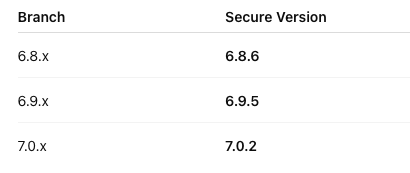
If your website is running an earlier version within these branches, it should be updated immediately.
What are the risks?
These vulnerabilities allow attackers to target vulnerable WordPress websites remotely. If a website is successfully compromised, an attacker may be able to:
- Gain unauthorized access to the WordPress installation.
- Execute malicious code through the website.
- Upload malware or persistent backdoors.
- Modify or delete website content.
- Steal sensitive data stored by the website.
- Host phishing pages or malicious content.
- Send spam or conduct other malicious activity from the compromised server.
If your VPS hosts multiple websites, compromising one vulnerable WordPress installation may also increase the risk to other websites on the same server, particularly if they share the same user account or have insecure file permissions.
Does this affect the VPS operating system?
No.These vulnerabilities are in WordPress Core, not in the Linux operating system or the VPS platform itself.
Updating your operating system packages (for example using apt, dnf, or yum) will not resolve this issue. Each WordPress installation must be updated individually.
What should I do?
We recommend taking the following actions immediately:
- Update every WordPress installation to the latest supported security release.
- Update all installed plugins and themes.
- Remove unused plugins and themes.
- Confirm that automatic updates are enabled where appropriate.
- Review WordPress administrator accounts and remove any unfamiliar users.
- Scan your website for malware or unauthorized file changes.
- Review web server and system logs for suspicious activity.
- Verify that you have recent, tested backups.
If you believe your website has already been compromised
Updating WordPress alone may not remove an existing compromise.
If you suspect your website has been affected:
- Restore from a known clean backup, or perform a complete malware cleanup.
- Remove any malicious files or unauthorized administrator accounts.
- Change all WordPress administrator passwords.
- Change database, SSH, FTP/SFTP, and hosting control panel credentials.
- Review the server for backdoors or other signs of persistence before returning the website to production.
Self-managed VPS responsibility
This advisory applies to customers using self-managed VPS services.
As the server administrator, you are responsible for maintaining your applications, including WordPress, plugins, themes, and their security updates.
Our infrastructure and virtualization platform are not affected by these vulnerabilities. However, websites running outdated versions of WordPress remain at risk until they are updated.